Articles by "JAVA"
Showing posts with label JAVA. Show all posts
A unique platform to get tutorials on basic and advance computer skills like programming, blogging. Get latest technology updates,news, tutorials

Previous Chapter  http://itechplatform.blogspot.com.ng/

 How Programs Work

Most computer programs are written in the same way that you write a letter—by typing each statement into a word processor. Some programming tools come with their own word processor, and others can be used with any text-editing software. If you don't already have a tool that can be used for Java programming, you can use the free Java 2 Software Development Kit, which you will learn about later in this hour, with any of your favorite editors.
When you have finished writing a computer program, you save the file just like saving any other document to disk. Computer programs often have their own filename extension to indicate what type of file they are. Java programs have the extension .java; an example of a Java program file name is Calculator.java.
To run a program you have saved as a file, you need some help. The kind of help that's needed depends on the programming language you're using. Some languages require an interpreter to run their programs. The interpreter is a program that interprets each line of a computer program and tells the computer what to do. Most versions of BASIC are interpreted languages. The advantage of interpreted languages is that they are faster to test. When you are writing a BASIC program, you can try it out immediately, spot any errors, fix them, and try again. The primary disadvantage is that interpreted languages run more slowly than other programs.
Other programming languages require a compiler. The compiler takes a computer program and translates it into a form that the computer can understand. It also does what it can to make the program run as efficiently as possible. The compiled program can be run directly without the need for an interpreter. Compiled programs run more quickly than interpreted programs, but they take more time to test. You have to write your program and compile it before trying it out. If you find an error and fix it, you must compile the program again to verify that the error is gone.
Java is unusual because it requires a compiler and an interpreter. You'll learn more about this later as you write Java programs.

 Share your thoughts, comments and new ideas and also share with your friends.
Continue later today.. 

Reference: Sam's Ebook
Source:informit
A unique platform to get tutorials on basic and advance computer skills like programming, blogging. Get latest technology updates,news, tutorials

Previous Chapter

 http://itechplatform.blogspot.com.ng/

Telling the Computer What to Do

A computer program, also called software, is a way to tell a computer what to do. Everything that the computer does, from booting up to shutting down, is done by a program. Windows XP is a program. Ms. Pac-Man is a program. The dir command used in MS-DOS to display file names is also a program. Even the Klez email worm is a program.
Computer programs are made up of a list of commands the computer handles in a specific order when the program is run. Each of these commands is called a statement.
If you're a science fiction fan, you're probably familiar with the concept of household robots. If not, you might be familiar with the concept of henpecked spouses. In either case, someone gives very specific instructions telling the robot or spouse what to do, something like the following:
  • Dear Theobald,
  • Please take care of these errands for me while I'm out lobbying members of Congress:
  • Item 1: Vacuum the living room.
  • Item 2: Go to the store.
  • Item 3: Pick up butter, lozenges, and as many bottles of Heinz E-Z Squirt green ketchup as you can carry.
  • Item 4: Return home.
  • Love,
  • Snookie Lumps
If you tell a loved one or artificially intelligent robot what to do, there's a certain amount of leeway in how your requests are fulfilled. If lozenges aren't available, cough medicine might be brought to you instead. Also, the trip to the store can be accomplished through a variety of routes. Computers don't do leeway. They follow instructions literally. The programs that you write will be followed precisely, one statement at a time.
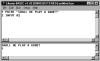
The following is one of the simplest examples of a computer program, written in BASIC. Take a look at it, but don't worry yet about what each line is supposed to mean.
1 PRINT "Shall we play a game?" 
2 INPUT A$ 
Translated into English, this program is equivalent to giving a computer the following to-do list:
  • Dear personal computer,
  • Item 1: Display the question, "Shall we play a game?"
  • Item 2: Give the user a chance to answer the question.
  • Love,
  • Snookie Lumps
Each of the lines in the computer program is a statement. A computer handles each statement in a program in a specific order, in the same way that a cook follows a recipe, or Theobald the robot followed the orders of Snookie Lumps when he vacuumed and shopped at the market. In BASIC, the line numbers are used to put the statements in the correct order. Other languages, such as Java, do not use line numbers, favoring different ways to tell the computer how to run a program.
Figure 1.1 shows the sample BASIC program running on the Liberty BASIC interpreter, a shareware program that can be used to develop Windows and OS/2 programs. Liberty BASIC, which was developed by Carl Gundel, is among many BASIC interpreters that can be found on the Internet for Microsoft Windows, Apple Macintosh, Unix, and Linux systems. You can find out more about it at http://www.libertybasic.com.
01fig01.gif Figure 1.1 An example of a BASIC program running in Liberty BASIC.
Because of the way programs operate, it's hard to blame the computer when something goes wrong while your program runs. After all, the computer was just doing exactly what you told it to do. Unless your hardware is on the fritz, a pesky virus is attacking your system, or your operating system is having a bad day, the blame for program errors lies with the programmer. That's the bad news. The good news is that you can't do any permanent harm to your computer with the programming errors you make. No one was harmed during the making of this book, and no computers will be injured as you learn how to program with Java.

Reference: Sams Ebook
Source:informit
A unique platform to get tutorials on basic and advance computer skills like programming, blogging. Get latest technology updates,news, tutorials

 Previous Chapter

Choosing a Language

As you might have surmised at this point, computer programming is not as hard as it's cracked up to be. If you're comfortable enough with a computer to create a nice-looking resume, balance a checkbook with software such as Intuit Quicken, or create your own home page on the Web, you can write programs.
The key to learning how to program is to start with the right language. The programming language you choose often depends on the tasks you want the computer to accomplish. Each language has things it is well-suited for, as well as things that are difficult—perhaps impossible—to do with the language. For example, many people use some form of the BASIC language when they are learning how to program because BASIC was created with beginners in mind.
Microsoft Visual Basic combines the ease of BASIC with some powerful features to aid in the design of Windows software. (VBScript, which is short for Visual Basic Script, offers the simplicity of BASIC for small programs that run in conjunction with World Wide Web pages.) Visual Basic has been used to write thousands of sophisticated programs for commercial, business, and personal use. However, Visual Basic programs can be slower than Windows programs written in other languages, such as Borland C++. This difference is especially noticeable in programs that use a lot of graphics—games, screen savers, and the like.
This book covers the Java programming language, which was developed by Sun Microsystems. Though Java is more difficult to learn than a language such as Visual Basic, it is a good starting place for several reasons. One of the biggest advantages of learning Java is that you can use it on the World Wide Web. If you're an experienced Web surfer, you have seen numerous Java programs in action. They can be used to create animated graphics, present text in new ways, play games, and help in other interactive efforts.
Another important advantage is that Java requires an organized approach for getting programs to work. The language is very particular about the way programs must be written, and it balks if programmers do not follow all of its rules. When you start writing Java programs, you might not see the language's choosy behavior as an advantage. You'll write a program and have several errors to fix before the program is finished. Some of your fixes might not be correct, and they will have to be redone. If you don't structure a program correctly as you are writing it, errors will result. In the coming hours, you'll learn about these rules and the pitfalls to avoid. The positive side of this extra effort is that your programs will be more reliable, useful, and error-free.
Java was invented by Sun Microsystems developer James Gosling as a better way to create computer programs. Gosling was unhappy with the way that the C++ programming language was working on a project he was doing, so he created a new language that did the job better. It's a matter of contentious debate whether Java is superior to other programming languages, of course, but the amount of attention paid to the language today shows that it has a large number of adherents. Book publishers obviously dig it—more than 1,000 books have been published about the language since its introduction. (This is my tenth, and I will keep writing more of them until prohibited by municipal, state, or federal law.)
Regardless of whether Java is the best language, it definitely is a great language to learn today. There are numerous resources for Java programmers on the Web, Java job openings are offered in many cities, and the language has become a major part of the Internet's past, present, and future. You'll get a chance to try out Java during Hour 2, "Writing Your First Program."
Learning Java or any other programming language makes it much easier to learn subsequent languages. Many languages are similar to each other, so you won't be starting from scratch when you dive into a new one. For instance, many C++ programmers find it fairly easy to learn Java, because Java borrows a lot of its structure and ideas from C++. Many programmers are comfortable using several different languages and will learn new ones as needed.
A unique platform to get tutorials on basic and advance computer skills like programming, blogging. Get latest technology updates,news, tutorials


Previous Chapter

Hour 1. Becoming a Programmer

Computer programming is insanely difficult. It requires a four-year degree in computer science, thousands of dollars in computer hardware and software, a keen analytical intellect, the patience of Job, and a strong liking for caffeinated drinks. If you're a programming novice, this is probably what you've heard about computer programming. Aside from the part about caffeine, all of the rumors are greatly exaggerated.
Programming is a lot easier than most people think, although there are several reasons why you might believe otherwise:
  • Computer programmers have been telling people for years that programming is hard. This belief makes it easier for us to find high-paying jobs (or so I've heard), and gives us more leeway to goof off during business hours.
  • Computer programming manuals are often written in a language that only a Scrabble player could appreciate. Strange acronyms like OOP, RAD, COM, and MUMPS are used frequently along with newly invented jargon like instantiation, bytecode, and makefile.
  • Many computer programming languages have been available only with software packages costing $200 or more, which is a lot of cabbage.
Because of the growth of the Internet and other factors, this is a great time to learn programming. Useful programming tools are being made available at low cost (or no cost), often as downloads from World Wide Web sites. Thousands of programmers are distributing their work under "open source" licenses so people can examine how the programs were written, correct errors, and add their own improvements.
The goal of this book is to teach programming to the person who has never tried to program before, or the person who tried programming but hated it with an intense passion. The English language will be used as much as possible instead of jargon and obscure acronyms, and all new programming terms will be thoroughly explained as they are introduced.
If I've succeeded, you will finish Sams Teach Yourself Java 2 in 24 Hours with enough programming skill to be a danger to yourself and others. You'll be able to write programs, dive into other programming books with more confidence, and learn programming languages more easily. You also will have developed skills with Java, the most exciting programming language to be introduced in a decade.
The first hour of this book provides some introductory material about programming and gives you instructions on how to set up your computer so you can write Java programs. The following topics will be covered:
  • Choosing which programming language to learn first
  • What Java is
  • Using programs to boss your computer around
  • How programs work
  • How program errors (called bugs) are fixed
  • Acquiring a Java development tool
  • Getting ready to write programs
A unique platform to get tutorials on basic and advance computer skills like programming, blogging. Get latest technology updates,news, tutorials


Part I: Getting Started

Hour

1 Becoming a Programmer
2 Writing Your First Program
3 Vacationing in Java
4 Understanding How Java Programs Work
A unique platform to get tutorials on basic and advance computer skills like programming, blogging. Get latest technology updates,news, tutorials


Introduction

As the author of computer books, I spend a lot of time loitering in the computer section of bookstores such as Barnes & Noble and Borders, observing the behavior of shoppers browsing through the books as if they were a hominid jawbone and I was a paleontologist.

Because of my research, I've learned that if you have picked up this book and turned to the introduction, I have around 12 more seconds before you put it down and head to the coffee bar for a double tall latte decaf skim with two shots of vanilla hold the whip.

So I'll keep this brief: This Java programming stuff is a lot easier than it looks. I'm not supposed to tell you that, because there are thousands of programmers who have used their Java skills to get high-paying jobs in software development, Internet programming, and e-commerce. The last thing any of them want is for their bosses to know that anyone who has persistence and a little free time can learn this language, the most popular programming language in use today. By working your way through each of the one-hour tutorials in Sams Teach Yourself Java 2 in 24 Hours you'll be able to learn Java programming quickly.

Anyone can learn how to write computer programs—even if they can't program a VCR. Java is one of the best programming languages to learn because it's a useful, powerful, modern technology that's being used by thousands of programmers around the world.

This book is aimed at non-programmers, new programmers who hated learning the subject, and experienced programmers who want to quickly get up to speed with Java. It uses Java 2 version 1.4, the current version of the language.

Java is the Tiger Woods of programming languages because of the things it makes possible. You can create programs that feature a graphical user interface, design software that makes the most of the Internet, connect to databases, add animation and sound to World Wide Web pages, and more.

This book teaches Java programming from the grounds up. It introduces the concepts in English instead of jargon, with plenty of step-by-step examples of working programs you will create. Spend 24 hours with this book and you'll be writing your own Java programs, confident in your ability to use the language and learn more about it. You also will have skills that are becoming increasingly important—such as network computing, graphical user interface design, and object-oriented programming.

These terms might not mean much to you now. In fact, they're probably the kind of things that make programming seem like a secret ritual known only to a small group of humans who have a language of their own. However, if you can use a computer to create an attractive resume, balance your checkbook, or create a home page, you can write computer programs by reading Sams Teach Yourself Java 2 in 24 Hours.

Note:
At this point, if you would rather have coffee than Java, please reshelve this book with the front cover facing outward on an endcap with access to a lot of the store's foot traffic.
A unique platform to get tutorials on basic and advance computer skills like programming, blogging. Get latest technology updates,news, tutorials

Hey, have you thought of learning, developing some new skills and unlocking some valuable knowledge?
Do you want to be a web developer or a programmer? or what?
Here is a great opportunity to get  some computer skills like web designing and programming full video tutorials series and eBooks at a cheaper cost, from beginner to advance stage
There are free beginners eBooks available below.
Format available: Pdf, video format and Online lectures(team viewer, webx meeting portal) >>>

1. Programming( Software development)
  • Vb.net programming
  • C# programming
  • Java Programming
no image
A unique platform to get tutorials on basic and advance computer skills like programming, blogging. Get latest technology updates,news, tutorials
When we consider a Java program it can be defined as a collection of objects that communicate via invoking each others methods. Let us now briefly look into what do class, object, methods and instance variables mean.
  • Object - Objects have states and behaviors. Example: A dog has states-color, name, breed as well as behaviors -wagging, barking, eating. An object is an instance of a class.
no image
A unique platform to get tutorials on basic and advance computer skills like programming, blogging. Get latest technology updates,news, tutorials

Try it Option Online

You really do not need to setup your own environment to start learning Java programming language. Reason is very simple, we already have setup Java Programming environment online, so that you can compile and execute all the available examples online at the same time when you are doing your theory work. This gives you confidence in what you are reading and to check the result with different options. Feel free to modify any example and execute it online.
no image
A unique platform to get tutorials on basic and advance computer skills like programming, blogging. Get latest technology updates,news, tutorials
Java programming language was originally developed by Sun Microsystems, which was initiated by James Gosling and released in 1995 as core component of Sun Microsystems.s Java platform (Java 1.0 [J2SE]).
As of December 08 the latest release of the Java Standard Edition is 6 (J2SE). With the advancement of Java and its wide spread popularity, multiple configurations were built to suite various types of platforms. Ex: J2EE for Enterprise Applications, J2ME for Mobile Applications.